

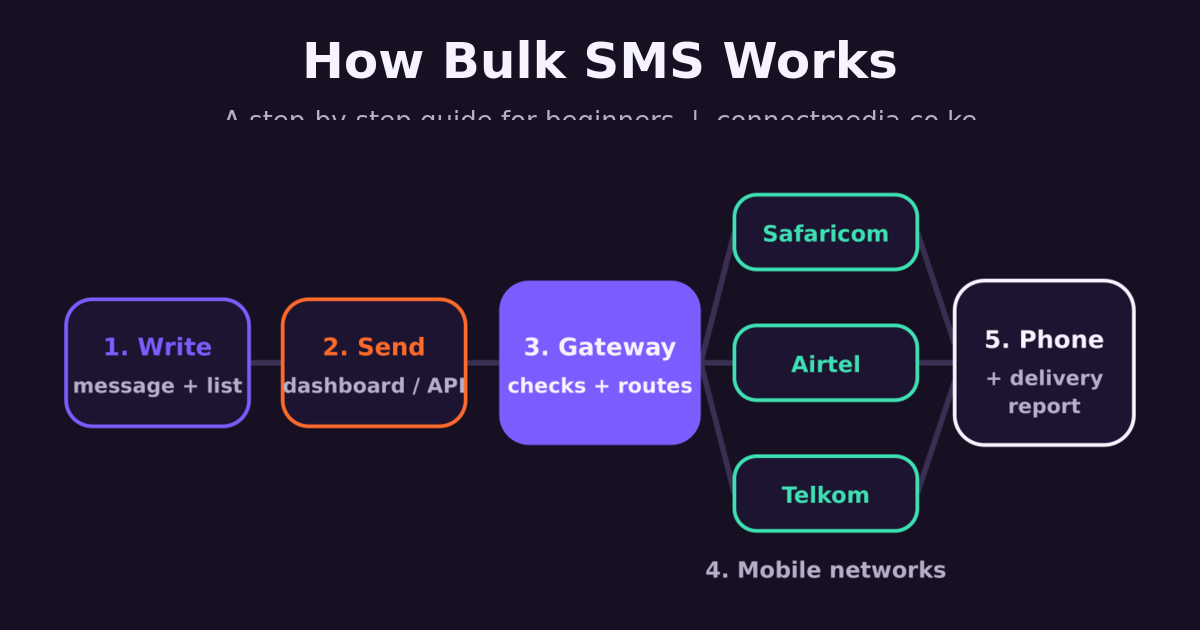
Bulk SMS lets you send one message to hundreds or thousands of phone numbers at once — fee reminders to parents, M-Pesa payment confirmations, appointment reminders, promotions. If you have never used it, the process can look technical. It isn’t. This guide walks through exactly what happens between typing your message and your customer’s phone buzzing, step by step.
Step 1: Open an account and top up
You start by creating an account with a bulk SMS provider, then buy SMS credit, usually through M-Pesa. With Connect Media there is no minimum top-up and your credit never expires, so you can start small and send when you need to. Each SMS uses credit; see pricing or estimate a campaign with the SMS cost calculator.
Step 2: Choose your sender ID
The sender ID is the name your customers see instead of a phone number — for example MYSCHOOL or ACMESACCO. A branded sender ID makes your messages instantly recognisable and far less likely to be ignored or mistaken for a scam. Sender IDs are registered with each mobile network (Safaricom, Airtel and Telkom), so apply early.
Step 3: Upload your contacts
Add the phone numbers you want to reach. Most people upload an Excel or CSV file exported from their school system, POS or phone book; you can also type numbers in or save them as reusable groups (parents of Form 2, active SACCO members, VIP customers). Numbers can be in any common Kenyan format — 0712…, 712… or +254712…. See how to send bulk SMS from Excel.
Only message people who have agreed to hear from you. Kenya’s Data Protection Act requires consent for marketing messages and an easy way to opt out — read our guide to SMS marketing and the Data Protection Act.
Step 4: Write the message
A standard SMS holds 160 characters. Emojis and some special characters switch the message to Unicode, which drops the limit to 70 characters per part — and longer messages are billed as several SMS. Keep it short: who you are, the key information, and one clear action. You can personalise each message with the recipient’s name or balance. Our GSM-7 vs Unicode guide explains the character rules, and there are ready-made SMS templates to borrow from.
Step 5: Send now or schedule
Press send, or schedule the message for a better time (for example 8am on the day of an appointment). Businesses with their own software skip the dashboard and send automatically through the bulk SMS API — for example a till system that texts a receipt after every sale.
Step 6: The gateway checks and routes each message
Behind the scenes, your message reaches the provider’s SMS gateway. The gateway checks your credit and sender ID, splits the list by network, and hands each message to the right operator — Safaricom, Airtel or Telkom. This takes seconds, even for thousands of numbers.
Step 7: The network delivers to the phone
The mobile network’s message centre delivers the SMS to each handset. If a phone is switched off or out of coverage, the network keeps retrying for a period, so the message usually lands as soon as the phone is back online. No internet connection or smartphone is needed on the customer’s side — which is why SMS still reaches more Kenyans than any app.
Step 8: Read your delivery reports
Each network reports back whether every message was delivered, is still pending, or failed (for example because the number is invalid or inactive). These delivery reports appear in your dashboard, so you can clean your list and resend to anyone who missed out. If you see many failures, check why bulk SMS is not delivered.
What you can use bulk SMS for
- Schools — fee reminders, closing dates, exam results (bulk SMS for schools)
- SACCOs and chamas — contribution and loan reminders (SACCOs and chamas)
- Churches — service announcements and events (churches)
- Clinics — appointment reminders
- Shops and online stores — offers, order updates and M-Pesa payment confirmations
- Apps — one-time passwords and alerts (SMS OTP)
Ready to send your first bulk SMS?
Connect Media bulk SMS delivers to Safaricom, Airtel and Telkom, with a branded sender ID, scheduling, delivery reports and an API for developers. Still comparing options? Read how to choose a bulk SMS provider in Kenya, or open an account and send a test today.
