

Sending a message isn’t the same as delivering it. Delivery reports tell you, for every SMS, whether it reached the phone — so you can prove delivery, fix problems and stop paying to message dead numbers.
What the statuses mean
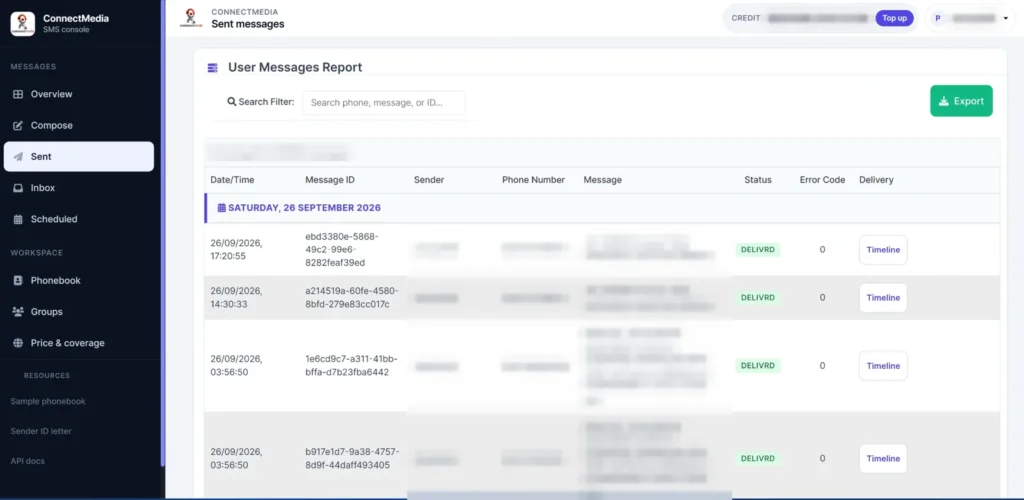
- Delivered: the network confirmed the message reached the handset.
- Pending / sent: accepted by the network but not yet confirmed — the phone may be off or out of coverage. Networks retry for a period.
- Failed / undelivered: the message could not be delivered, for example an invalid or inactive number, or a blocked message.
Why messages fail
- Wrongly formatted or inactive numbers.
- Do Not Disturb on promotional messages.
- Sender ID not approved on that network.
- Content filtering.
Full troubleshooting guide: why bulk SMS isn’t delivered.
Using reports well
- Clean your lists: remove numbers that fail repeatedly.
- Compare networks: a drop on one network points to a sender ID or filtering issue.
- Support: when a customer says “I never got it”, check the report.
- Proof: keep delivery records for compliance and disputes.
Get reports via the API
curl -X POST "https://app.connectmedia.co.ke/api.php" \
  -H "Authorization: Bearer $CM_API_KEY" \
  -d action=history -d limit=100 -d start_date=2026-10-01 -d end_date=2026-10-07
The history action returns sent messages with their status. See the API docs.
Get started
Create a Connect Media account — SMS from KES 1.0, no minimum top-up, credit that never expires, and one account for Safaricom, Airtel and Telkom. Call +254 707 339 945 or email info@connectmedia.co.ke.
What delivery reports look like
Frequently asked questions
What is an SMS delivery report?
A delivery report is the network's confirmation of whether an SMS reached the recipient's phone.
Why does a message show as pending?
The phone may be off or out of coverage. The network keeps retrying for a period before the message expires.
Are delivery reports included?
Yes. Connect Media includes a delivery status for every message, in the dashboard and through the API.